Search Mobile App

  • Subscribe to our RSS feed.
  • Twitter
  • StumbleUpon
  • Reddit
  • Facebook
  • Digg

Wednesday, 15 May 2013

A multi-screen and conversational search experience

Posted on 11:16 by Unknown
Search has always been about giving you the best answers quickly, regardless of what device you use. At Google I/O today, we gave an update on where we are in building the search engine of the future--a search engine that can answer your questions, have a conversation with you, and even give you useful things without you ever having to ask.

A conversation with search -- across your devices

People communicate with each other by conversation, not by typing keywords -- and we’ve been hard at work to make Google understand and answer your questions more like people do. Already, you can tap a mic, talk to Google in a more natural way and get responses spoken back to you on Android, iPhone, and iPad devices.

Today, we previewed what this conversational experience will look like in Chrome on your desktops and laptops. Soon, you’ll be able to just say, hands-free, “OK Google, will it be sunny in Santa Cruz this weekend?” and get a spoken answer. Then, you’ll be able to continue the conversation and just follow up with “how far is it from here?” if you care about the drive or “how about Monterey?” if you want to check weather somewhere else, and get Google to tell you the answer.


Better answers - Improvements to the Knowledge Graph

We announced the Knowledge Graph -- our map of real-world people, places and things -- less than a year ago and since then have been adding more depth. We’ve also expanded it to make search more intelligent in other languages. And starting today, you’ll get richer answers from the Knowledge Graph if you speak Polish, Turkish, and Traditional and Simplified Chinese.

You’ll also get smarter answers to questions like “what’s the population of Canada?” Not only will Google answer that question, but you also get an answer to the next few follow-up questions people often ask. In a single card, you’ll see how Canada’s population changed over time -- and a comparison with California and Australia.


Google Now: a new take on reminders, and new cards

Google Now is about providing you with just the right information at just the right time. With the new reminders in Now, not only can you save things to remember later, but you can actually pick a time or place to trigger those reminders, so they pop up at just the right time. Because a note to buy milk, paper towels and food for the dog, is a lot more helpful when you’re actually at the grocery store. Or if you’re about to miss the last train home, Google Now can remind you that you better leave. And if you’re interested in an upcoming book or there’s a new album you’re excited to listen to, Google Now will shoot you a reminder when it comes out, and even provide a recommendation. And the best part is, you can create some of these reminders with just your voice.


With just the tap of a mic or flick of a finger, millions of people across the world can easily tap into the entire world’s knowledge and find what they need to make their lives better, or just have their day run a little smoother. That’s why we’re so excited about the new search experience we’re building at Google and it will change how we experience life.

Posted by Amit Singhal, Senior Vice President
Read More
Posted in | No comments

Wednesday, 8 May 2013

More than 70 of the world’s languages in the blink of an eye

Posted on 11:23 by Unknown

If you took a quick snapshot of content available on the web, you might think that everyone around the world spoke English, Chinese, French or Spanish. But in fact, millions of people around the world speak an incredible array of languages that currently have a small presence across the web.


Google Translate helps bridge the divide between the content available online and people’s ability to access that information. Starting today, you can translate another five languages using Google, which combined are spoken by more than 183 million people around the globe:


  • Bosnian is an official language in Bosnia and Herzegovina that’s also spoken in regions of neighboring countries and by diaspora communities around the world.
  • Cebuano is one of the languages spoken in the Philippines, predominantly in the middle (Visayas) and southern (Mindanao) regions of the nation.
  • You can hear the Hmong language spoken in many countries across the world, including China, Vietnam, Laos, Thailand and throughout the United States.
  • Javanese is the second most-spoken language in Indonesia (behind Indonesian), with 83 million native speakers.
  • Marathi is spoken in India and has 73 million native speakers. Google Translate already supports several other Indian languages: Bengali, Gujarati, Hindi, Kannada, Tamil, Telugu and Urdu.


With the exception of Bosnian, these new languages are “alpha,” meaning while the quality isn’t perfect, we will continue to test and improve them over time.


You can access Translate on the web at https://translate.google.com, on your Android or iOS device, or via Chrome and in Gmail. We are excited to reach the 70+ language milestone, and we look forward to continuing to add more languages.


Bosnian: Google Prevodilac sada podržava više od 70 jezika!
Cebuano: Google sa Translate misuporta na karon sa kapin sa 70 ka mga!
Hmong: Google Translate nim no txhawb nqa tshaj li 70 hom lus!
Javanese: Google Translate saiki ndhukung luwih saka 70 basa!
Marathi: Google भाषांतर आता 70 पेक्षा जास्त भाषांचे समर्थन करते!

Posted by Sveta Kelman, Program Manager, Google Translate
Read More
Posted in | No comments

Friday, 3 May 2013

Tips for Learning the Spanish Subjunctive Tense

Posted on 15:29 by Unknown
The Spanish subjunctive tense.  Just whispering the words "Spanish subjunctive tense" is enough to make make even the most accomplished Spanish students come to tears.

It's not easy.  In fact, I would dare say the subjunctive tense and reflexive verbs are the most troublesome parts of the Spanish language and I don't think many people would disagree.

If you've been studying Spanish for any significant amount of time, I already know what you're thinking..."Great, tell us something we don't know.   What's your point?".

Well, in this post I don't plan on trying to teach you the subjunctive, there are plenty of people who can do a much better job of that than I can.  What I do hope to accomplish is to pass on to you some of the strategies and resources I used to help me win a few battles against the subjunctive.  I'm still trying to win the war, but when it comes to the Spanish subjunctive, I'll take whatever progress I can get.

Enough chit-chat, it's time to get down to business.  Let's start with that advice I mentioned I wanted to share with you.

If you don't know, the subjunctive mood has a lot of rules.  And I do mean a lot. So where should you start you ask?  That one is actually easy.


Start with commands and the present tense conjugations and usage.  
You may not know it, but anytime you give someone  a command or make a request, you're using the subjunctive.

Por favor, no te sientas en esa silla, está sucia
Please, don't sit in that chair, it's dirty 
¿Qué quieres que te diga?
What do you want me to tell you?
Learning the commands first will help you nail down those subjunctive present tense conjugations.  The rules regarding when to use the present tense subjunctive mood conjugations really aren't all that bad.  Besides, learning how to tell people what to do is kind of fun.

You may have heard of a website called Notes In Spanish ran by a lovely couple named Ben and Maria.  They live in Spain and have put out some great material.  It so happens they put together a fantastic video on the subjunctive.  You can find it on YouTube.  In fact, I've already done that for you, here it is:

You can thank me later, for now just enjoy the video.

Now it's time for my second piece of consejos.  

Don't try to learn all of the subjunctive rules at once.   I tried that and it drove me crazy. And it didn't work.  Instead, just select a few rules at a time.   Choose the ones that are easy for you to remember and that make sense without having to put in too much effort. Stick with those rules until you get them down pat.
As you start to get a handle on the rules, start adding a few more and slowly progress through them.
Here's the important part. Practice actually using the subjunctive in conversations. Nothing will help you learn the subjunctive more than using it in real life. Start looking for the subjunctive constructions you're learning about in the things you read and hear.

My third and final piece of advice.

I see soooo many people asking the dreaded "W" question -- "Why?".  Why this and why that?  And these questions are always grammar related.  The irony of this is they can't even answer the same questions about English grammar, but yet they just have to know the answer.

My pet peeves aside, in the beginning don't worry so much about the "why", just accept that in Spanish certain things work a certain way and that's that.  Eventually after you get comfortable using the structures in question, in this case the subjunctive, things will start to make more sense and the "why" won't be so mysterious or hard to understand anymore.  Using that approach might save you a lot of headaches.

Now it's time for me to share with you some of the tools I used to finally get the upper hand on this monster called the subjunctive tense.

If you've never heard of Learning Spanish Like Crazy, then you've really been missing out on a great course.   In regards to the Spanish Subjunctive tense,  Learning Spanish Like Crazy Level 2 devotes 10 lessons to the subjunctive tense.  If you go the product page there's a course outline that lists the entire course content, and also outlines what each subjunctive lesson covers, things like "Subjunctive mood when expressing desire or preference" and "Subjunctive using phrases such as "es mejor que" and "es necesario que" ".

If you're wondering why I recommend Learning Spanish Like Crazy  Level 2 for learning the subjunctive it's because you learn from listening and repeating sentences and dialogues spoken by native speakers instead of trying to memorize the rules from a book, which is incredibly boring, but I probably don't need to tell you that.  The method of learning they use is much more in line with how we learned our native language.

If you're more of a beginner and not quite ready for the subjunctive but could use something to help you boost your Spanish, then check out Learning Spanish Like Crazy Level 1.  
The subjunctive can be tough, but if you tackle it in bite size pieces it won't be so bad. Remember, learning the subjunctive will be a long term process, it may take years, so buckle in for the long haul. Move forward step-by-step and you'll get the hang of it.  Don't beat yourself up for making mistakes, making mistakes is how we learn.  
Remember, the more you use your Spanish, the faster you learn. Speaking, reading and listening are the keys that actually unlock the subjunctive, not trying to memorize the rules from a grammar book or any where else.
Suerte!
Read More
Posted in Grammar | No comments

Tuesday, 30 April 2013

Google+ Sign-In: Bringing App Activities to Google Search

Posted on 08:29 by Unknown
Cross-posted from The Google+ Developers Blog

When users search for your app, they often want to go deeper and see what in-app content fellow users find interesting. Today we're making this possible by bringing app activity to Google search results.


Aggregate app activity for SoundCloud in Google Search.


Soon, if you search for a site or app on Google.com (and that app has integrated with Google+ Sign-In app activities), you'll see popular and aggregate user activity to the right of search results. Searching for Fandango, for example, will show the top movies among Google users. And when you click on a movie, you’ll go directly to its page on Fandango.


The current Google Search results page for Fandango (left) and the Google Search page results with app activities (right).

We're rolling out this feature in desktop Search over the next few weeks, starting with a limited number of music and movie apps — including Deezer, Fandango, Flixster, Slacker Radio, Songza, SoundCloud and TuneIn — but we'll be adding more apps over time.


We've got lots more improvements planned, so stay tuned for more updates.


Posted by Seth Sternberg, Director of Product Management, Google+
Read More
Posted in | No comments

Tuesday, 16 April 2013

Making your mobile search faster

Posted on 09:26 by Unknown
When you’re searching for information on the go, speed matters. If you want to check out Rotten Tomatoes for a new movie to go see with your friends, you might not want to navigate through the Rotten Tomatoes homepage to find the list of top movies while your friends are anxiously waiting. Now, there’s a faster way to get to the Rotten Tomatoes page with just the info you need most -- just look for a new quick link for “In Theaters” underneath the main Rotten Tomatoes link when you search on your mobile phone. You’ll see these expandable sitelinks appear for many sites to help you get to a specific section quickly.


Also starting today, on some searches you’ll see a blue “Quick view” badge next to a few results. Say you’re new to poker or need a quick refresh on hands -- just search for “poker hands”, and you can now click the blue badge and see a quick view of the Wikipedia page listing out the poker hands immediately.


Quick view is an experimental project and is currently enabled for pages from Wikipedia when you search in English on Google.com. We are working to expand this to additional websites.

(Webmasters can subscribe to updates here to learn about participating in the mobile quick view field trial.)

Posted by Hiroshi Mizuno and Alex Fischer, Software Engineers
Read More
Posted in | No comments

Wednesday, 27 March 2013

The World’s Languages in Your Pocket (No Internet Required)

Posted on 10:45 by Unknown
Have you ever found yourself in a foreign country, wishing you knew how to say "I'm lost!" or "I'm allergic to peanuts”? The Internet and services like Google Translate can help—but what if you don't have a connection?

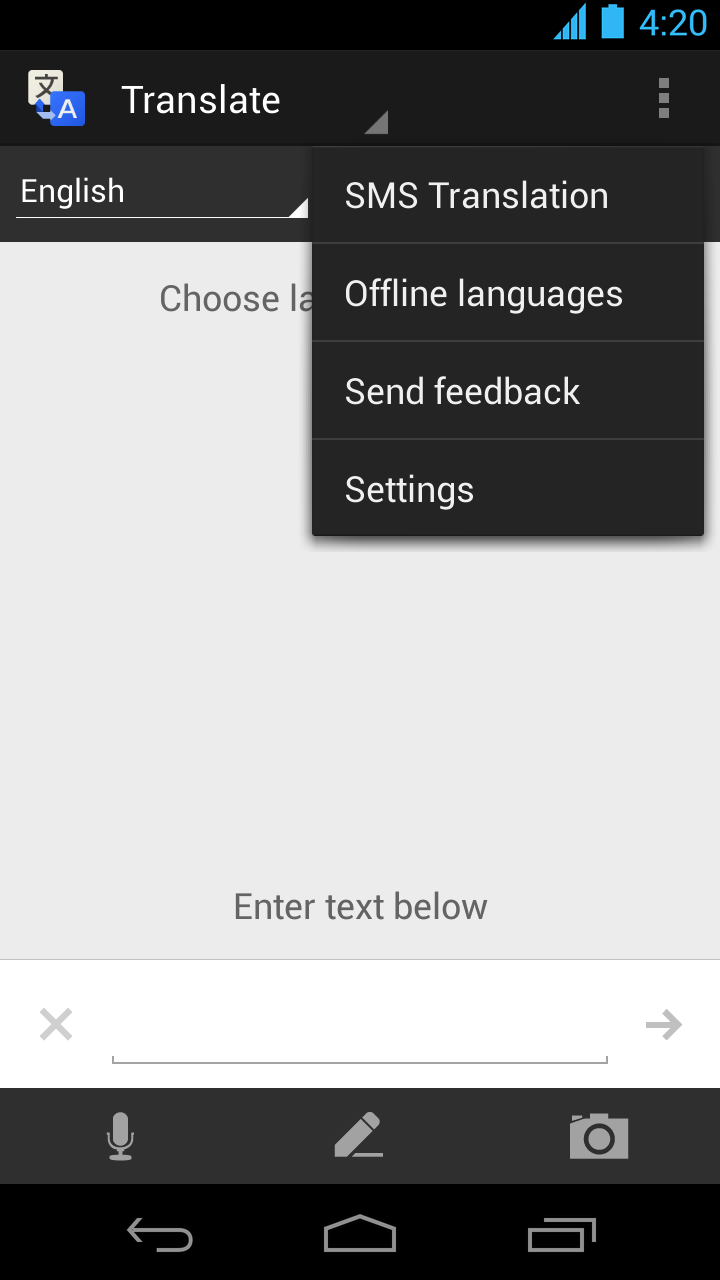
Today we're launching offline language packages for Google Translate on Android (2.3 and above) with support for fifty languages, from French and Spanish to Chinese and Arabic.

You can select [Offline Languages] in the app menu to see all the offline language packages available for download. To enable offline translation between any two languages, you just need to select them in the offline languages menu. Once the packages are downloaded, you're good to go.


While the offline models are less comprehensive than their online equivalents, they are perfect for translating in a pinch when you are traveling abroad with poor reception or without mobile data access.


So go out and explore another language or another culture without worrying about Internet access. There’s a whole world offline out there.

Posted by Minqi Jiang, Associate Product Manager
Read More
Posted in | No comments

Friday, 1 March 2013

Billions of times a day in the blink of an eye

Posted on 08:55 by Unknown
Ask a question, get an answer. But what happens in between? Last year we released an animated site that illustrates an email's journey to friends and family around the world. Today we're releasing a similar website called How Search Works.


Here you can follow the entire life of a search query, from the web, to crawling and indexing, to algorithmic ranking and serving, to fighting webspam. The site complements existing resources, including this blog, the help center, user forums, Webmaster Tools, and in-depth research papers.

A few things you'll find:
  • An interactive, graphical explanation of Google Search
  • A view into major search algorithms and features
  • A 43-page document explaining how we evaluate our results
  • A live slideshow of spam as we remove it
  • Graphs illustrating the spam problem and how we fight it
  • A list of policies that explain when we'll remove content
We hope the site helps to illuminate the split-second journey from algorithms to answers. The animated site is available today in English and there's also a text-only version in 43 languages.

Posted by Jake Hubert, Product Manager
Read More
Posted in search tips | No comments
Newer Posts Older Posts Home
Subscribe to: Posts (Atom)

Popular Posts

  • Tengo que lavar los trastes
    Sometimes there are things that we just have to do.  Well, if you ever need to tell someone what that something you have to do is in Spanish...
  • Find more while you browse with Google Related
    (Cross-posted on the Official Google Blog and Chrome Blog ) Almost every time I go online, I come across some new topic or item that I’d li...
  • New snippets for list pages
    Snippets—the few lines of text that appear under every search result—are designed to give you a sense for what’s on the page and why it’s re...
  • High-quality sites algorithm launched in additional languages
    (Cross-posted from the Webmaster Central blog ) For many months, we’ve been focused on trying to return high-quality sites to users . Earlie...
  • Microdata + Sports Stats = Happy Fans
    Editor’s Note: Today's guest author is Chris Jason from the Digital Media team at ESPN . With baseball season in full swing, Chris is wr...
  • The evolution of sitelinks: expanded and improved
    (Cross-posted on the Official Google Blog ) When you’re searching, you often have a specific task in mind, like figuring out which exhibits ...
  • The latest update to Google Social Search: Public Google+ Posts
    Back in 2009, we launched Google Social Search, and we've made several improvements since then. And earlier this year we made an upda...
  • Another look under the hood of search
    ( cross-posted on the Official Google Blog ) Over the past few years, we’ve released a series of blog posts to share the methodology and pr...
  • Get to your answer quicker with Instant Pages
    During our Inside Search event in June, we announced Instant Pages , which helps you skip the extra seconds spent waiting for a page to loa...
  • Kicking off football season with NFL live results in search
    Just as the NFL season kicks off and you have your fantasy football league ready to go, you’ll be able to get useful information such as the...

Categories

  • Beginner Lessons
  • flight search
  • Grammar
  • images
  • knowledge graph
  • local
  • mobile
  • quick answers
  • search quality
  • search stories
  • search tips
  • Spanish Blunders
  • Teach Yourself Spanish
  • trends
  • universal search
  • webmasters

Blog Archive

  • ▼  2013 (37)
    • ▼  November (5)
      • Tengo que lavar los trastes
      • Tuve un buen tiempo
      • Making conversations easier with Google Translate
      • Save your flights and find them on all devices
      • Make more of your day with the updated Google Sear...
    • ►  October (1)
    • ►  September (6)
    • ►  August (3)
    • ►  July (4)
    • ►  June (1)
    • ►  May (7)
    • ►  April (2)
    • ►  March (2)
    • ►  February (3)
    • ►  January (3)
  • ►  2012 (57)
    • ►  December (4)
    • ►  November (2)
    • ►  October (4)
    • ►  September (5)
    • ►  August (5)
    • ►  July (2)
    • ►  June (4)
    • ►  May (8)
    • ►  April (2)
    • ►  March (8)
    • ►  February (8)
    • ►  January (5)
  • ►  2011 (75)
    • ►  December (14)
    • ►  November (13)
    • ►  October (9)
    • ►  September (9)
    • ►  August (11)
    • ►  July (8)
    • ►  June (8)
    • ►  May (3)
Powered by Blogger.

About Me

Unknown
View my complete profile